

LARA Wizard
- Built-in, Not Bolted On: LARA is pre-integrated into Lightware's core products – no extra hardware or software to manage.
- No Programming Required: Create complete room control configurations using the intuitive Wizard interface - no coding needed.
- Power for Advanced Users: Need full control? Customize configurations or build advanced modules using JavaScript.
- Seamless Integration: Direct compatibility with industry-leading companies specialized in video conferencing, audio, display and control systems.
- Hybrid Meeting Ready: LARA ensures seamless integration with popular conferencing tools like Microsoft Teams and Webex, while managing cameras, microphones, roombars and shared displays without hassle.
From Concept to Configuration in Minutes
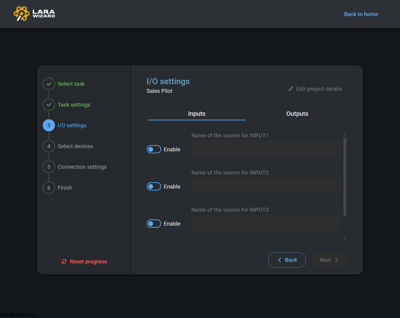
LARA (Lightware Room Automation) Wizard streamlines the entire process of building room automation setups. By answering a few guided questions, integrators and AV professionals can define the room type and requirements.
The wizard instantly generates the needed configuration file ready to upload to any compatible Lightware device such as Taurus UCX, Taurus TPX, Taurus TPN or MMX2.
Integrators also have the option to further finetune the configuration in the LARA Editor. It is ideal for AV users, IT admins and integrators at all levels. The wizard walks you through key decisions, predefined device selections and outputs a working configuration in minutes which could be fine-tuned later.
Experience how Lightware makes professional room automation accessible to integrators at all skill levels.
More from Lightware
The Alliance
Carefully vetted, trained and certified, PSNI Global Alliance is built of tested and trusted AV and UCC experts, providing a deep-and-wide global network that powers human connections.
Frequently Asked Questions
What is LARA, and how does it simplifies the deployment of AV systems in meeting spaces?
LARA (Lightware Advanced Room Automation) is Lightware's built-in room automation platform, which simplifies AV system control in meeting spaces. Pre-integrated into Lightware's core products, it empowers everyone to design, deploy and manage professional AV systems quickly and efficiently.
What is the biggest benefit of using the LARA Wizard?
A key part of the efficiency is the LARA Wizard interface. This online service allows users to get started quickly by delivering reliable room control through an online interface, without the need to write any code.
What is the setup process of the LARA Wizard?
Set up is straightforward, users simply select the room type and set up needs, and the LARA Wizard will generate a configuration file. Once this file is uploaded to a compatible Lightware device, the system is ready to be used as desired. Integrators also have the option to further finetune the configuration in the LARA Editor. Current supported devices include the complete Taurus UCX, Taurus TPN, Taurus TPX and the MMX2 series.